EverythingMartech

Global MarTech Governance: Standardization vs Local Flexibility

One global MarTech platform. Twenty countries. Twenty different ways of working. Here is what to standardize globally, what to leave to local teams, and how to build a federated governance model into the platform itself.

35 min read · Applies to: Marketo, Salesforce Marketing Cloud, HubSpot

Written by

One global MarTech platform. Twenty countries. Twenty different ways of working.

Should headquarters control everything? Or should local marketing teams have the freedom to operate independently?

This is one of the most important questions in global MarTech governance, and both extreme answers create problems. Centralize everything, and global marketing operations turns into a queue: every campaign needs approval, local teams miss market opportunities, and regional marketers depend on headquarters for routine work. Decentralize everything, and you get a different kind of mess: different lead lifecycle definitions, inconsistent campaign names, fragmented reporting, duplicated processes and conflicting data practices. One technology ecosystem, but several operating models that struggle to work together.

The answer is not choosing between standardization and flexibility. It is knowing where each belongs, and then building that decision into the platform so people do not have to remember it.

This guide gives you a practical way to do that. By the end you will be able to:

  • Compare centralized, decentralized and federated MarTech operating models, and choose one deliberately.
  • Separate what must be standardized globally from what should be decided locally, with a reason for each.
  • Assign decision rights so every team knows what it owns, what it is consulted on and what it cannot change.
  • Enforce standards inside your marketing automation platform, with verified configuration steps for Adobe Marketo Engage and pointers for Salesforce Marketing Cloud Engagement and HubSpot.
  • Give mature and less mature markets different levels of autonomy without creating two rulebooks.
  • Measure governance by outcomes, and audit naming compliance automatically with a read-only script.

Important: this is a proposed governance framework, not the description of a specific company’s internal operating model. Platform features were checked against vendor documentation in October 2026. Names, countries, numbers and scenarios are illustrative. Nothing here is legal advice; confirm consent and privacy requirements with your own privacy and legal teams.

Quick answer

The most effective global MarTech governance model is usually federated: a global team owns the guardrails, local teams own execution inside those guardrails, and both share accountability for business outcomes. Standardize what must stay consistent across countries: data definitions and lifecycle stages, consent principles and compliance controls, security and access, integration patterns, naming and reporting conventions, and platform architecture. Localize what creates market relevance: messaging and language, audience strategy within approved policies, campaign timing, channel mix and cultural experience. Then enforce the standards in the platform itself (approved templates, required fields and tags, automated naming checks, role-based access, quality gates and approval workflows) rather than in a long document. Give experienced markets more autonomy and smaller markets more central support, keep the standards the same for both, and judge the model by data quality, campaign reliability, speed, reporting comparability, compliance and adoption.

Key takeaways

  1. Both extremes fail in predictable ways. Full central control creates bottlenecks and dependency. Full local autonomy creates incompatible data, reporting and compliance practices.
  2. Standardize the foundations, localize the experience. If inconsistency in an element would break reporting, integration, compliance or security across countries, it belongs to the global standard. If it mainly affects relevance to a local audience, it belongs to the local team.
  3. Decision rights matter more than org charts. Write down who decides, who is consulted and who is informed for each type of change. Most governance conflict is ambiguity, not disagreement.
  4. Governance that lives only in documents does not scale. Templates, required tags, naming validation, permissions and approval workflows make the right way the easy way.
  5. Same standards, different support. Autonomy should follow demonstrated capability, so tie each market’s level of independence to clear, measurable criteria.
  6. Measure outcomes, not rules. A good model improves data quality, reliability, speed, comparability, compliance and adoption. The number of approvals is not a success metric.

Why global MarTech governance is so hard

MarTech governance is the set of standards, decision rights, controls and processes that decide how a marketing technology stack is used: who can do what, to which data, following which rules, and how compliance with those rules is checked. In a single-country team, governance can stay informal because everyone sits close together. Across twenty countries, informal governance breaks down quickly.

Three forces pull in different directions:

  • Scale and comparability. Leadership wants one global funnel, one definition of a qualified lead and reports that compare markets like for like. That requires shared definitions and shared structures.
  • Market relevance. Customers in Japan, Germany and Brazil do not respond to the same message, timing or channel. Local teams know this best and need room to act on it.
  • Risk. Privacy and anti-spam laws differ by jurisdiction, and a single platform means a mistake in one market can affect data and sender reputation for all of them.

When these forces are not balanced deliberately, an organization usually drifts toward one of two failure modes.

Symptom Over-centralized Over-decentralized
Campaign speed Long queues; local teams wait for headquarters to build routine emails Fast locally, but every country reinvents the same programs
Data Consistent, but fields that local teams need are often missing Each country adds its own fields and picklist values; duplicates multiply
Lifecycle One definition, sometimes ignored in practice because it does not fit some markets Several MQL definitions; global funnel reports are not comparable
Reporting Clean global reports, little local insight Rich local reports that cannot be rolled up
Compliance Central control, but local legal nuances can be missed Local practices vary; hard to prove which rule applied to which record
People Regional marketers lose skills and ownership; headquarters burns out Duplicate headcount and tools; knowledge stays in silos

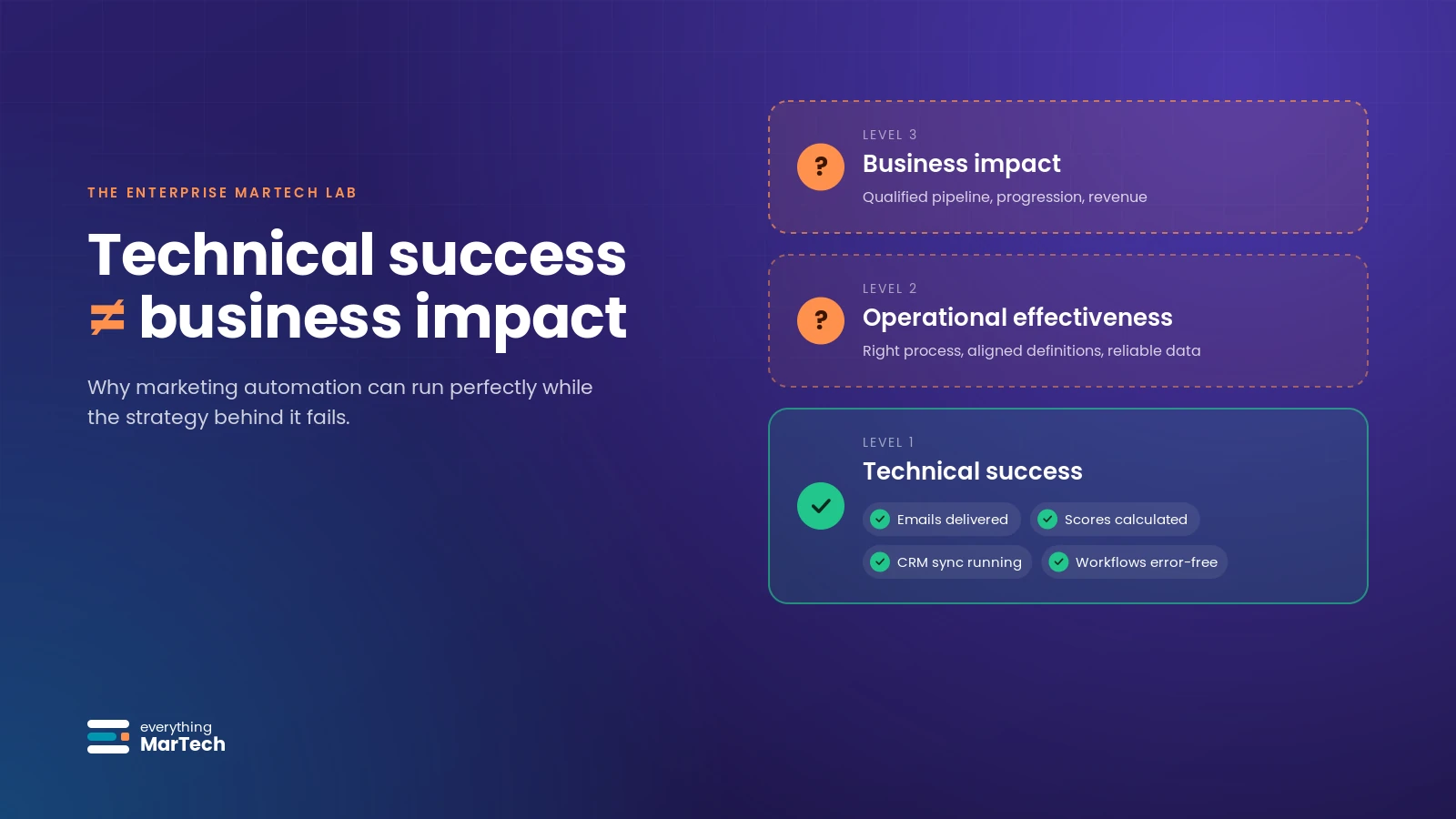
The pattern in the right-hand column links directly to Lab #001: the technology “works” (emails send, scores calculate, syncs run), but the business cannot trust what it reports.

Three operating models compared

Most enterprises end up somewhere on a spectrum between three models. The labels vary (some call the middle option “hybrid” or “hub-and-spoke”), but the decision rights behind them are what matters.
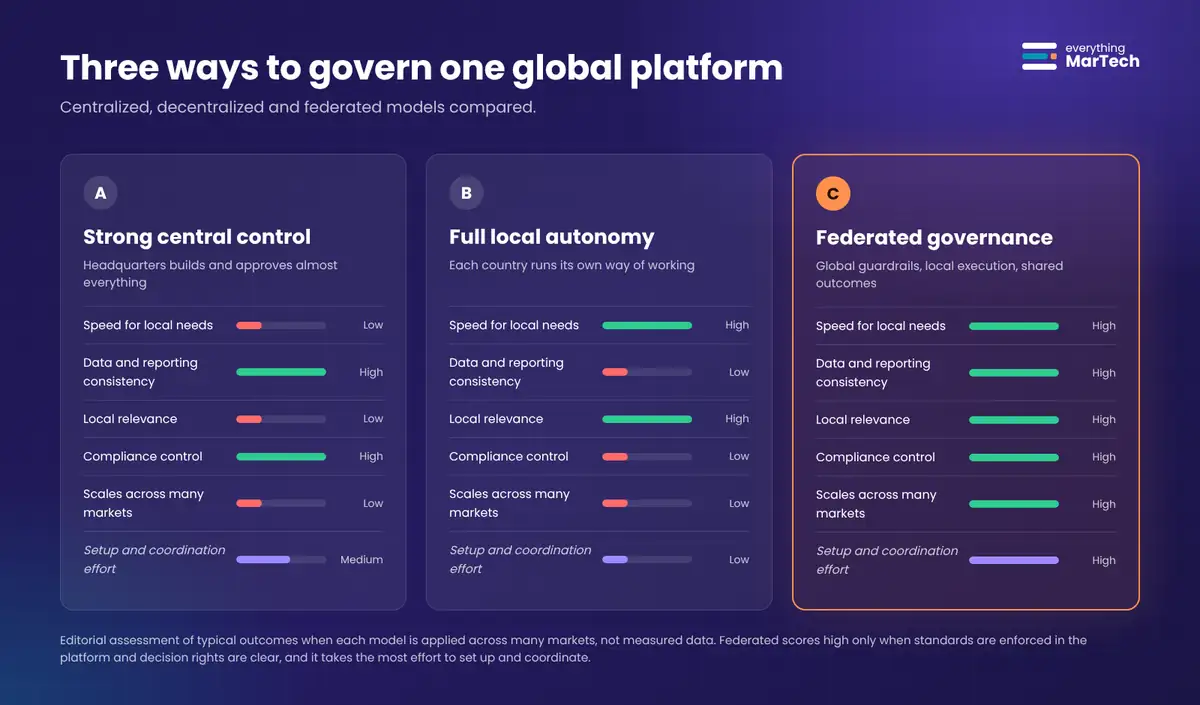
Three side-by-side columns compare centralized, decentralized and federated MarTech governance on speed for local needs, data and reporting consistency, local relevance, compliance control and scalability; federated rates high on all five but also needs the most setup and coordination effort.
A. Strong central control B. Full local autonomy C. Federated governance
Who builds campaigns Central team builds almost everything Each country builds its own Countries build from global templates; central team builds shared assets
Who sets standards Central team Each country, informally Global team, with regional input through a governance council
Speed for local needs Slow; depends on central capacity Fast Fast for routine work, governed for high-risk changes
Data and reporting consistency High Low High for shared definitions, flexible for local extensions
Local relevance Often low High High
Compliance control Strong, but can miss local nuance Uneven Global principles with local legal input
Cost profile Concentrated central headcount Duplicated skills and tools Shared platform and CoE, lighter local teams
Setup and coordination effort Medium Low at first, high later when you try to consolidate Highest: needs standards, templates, roles, tiers and a council
Fits best when Few markets, low maturity, high regulatory risk, or a platform migration is underway Business units are truly independent and share no customers, data or reporting Many markets share customers, data, brand or reporting, and maturity varies

D. A different model entirely. Some organizations run separate platform instances per region, or outsource execution to an agency while keeping governance in-house. These can be the right call (see Alternatives and variations), but they trade away shared data and comparable reporting, so the decision should be explicit.

For most global organizations that share customers, brand and reporting across markets, federated governance is the strongest default. It is not a compromise where everyone gets half of what they want. It is a deliberate split of responsibilities: global teams own the guardrails, local teams own execution within those guardrails, and both share accountability for business outcomes.

The federated MarTech governance framework

The framework has five principles. The first two decide what is governed globally and locally. The third decides how governance is enforced. The fourth adapts the support model to each market. The fifth decides how you know it is working.
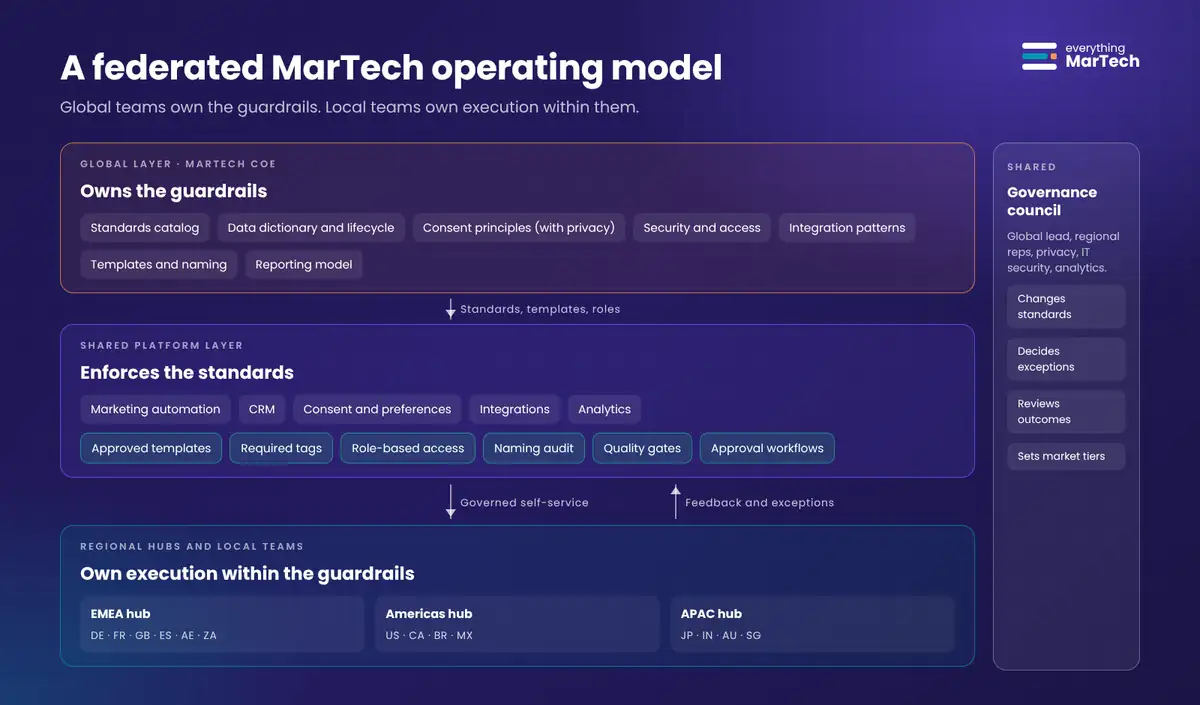
Three-layer federated operating model: a global MarTech CoE layer owning standards, data dictionary, consent principles, security, integration patterns, templates and reporting; a shared platform layer with marketing automation, CRM, consent, integrations and analytics, enforced through templates, required tags, role-based access, a naming audit, quality gates and approval workflows; and EMEA, Americas and APAC hubs with local teams executing campaigns. A governance council spans all layers.
Proposed operating model. The global layer publishes standards and shared assets; the platform enforces them; local teams execute and feed improvements back.

1. Standardize what must remain consistent globally

A useful test: if inconsistency in this element would break integration, reporting, compliance or security across countries, standardize it.

Standardize globally What the standard covers Why it must be global Example standard (illustrative)
Data definitions and lifecycle standards Field dictionary, picklist values, required fields, lifecycle stages and their entry criteria, lead source taxonomy Global funnel reporting and CRM sync depend on everyone meaning the same thing “MQL = behavior score ≥ 50 and fit score ≥ 40 and valid business email. Countries may add local fit criteria but cannot change the threshold logic.”
Consent principles and compliance controls How consent is captured, stored, evidenced and withdrawn; suppression rules; which fields hold consent Proof of consent and opt-out handling must work for every record, whichever country captured it “Every opt-in records date, source, wording version and jurisdiction. Withdrawal is processed globally, not per country.”
Security, access and integration governance Roles, permission sets, API users, integration approval, vendor onboarding One compromised or over-privileged account affects every market “No shared logins. API users have the minimum permissions for their integration and an owner.”
Campaign naming and reporting conventions Program naming pattern, channels, required tags, period cost rules, UTM conventions Reports by country, channel and program type only work if names and tags are consistent “Programs follow YYYY-MM_CC_TYPE_Short-Name; Country and Business Unit tags are required.”
Platform architecture and quality requirements Workspace and partition design, folder structure, template library, deliverability settings, QA checklist Structural changes are expensive to reverse and affect everyone “New workspaces or partitions require architecture review. Every email passes the global QA checklist.”

Practitioner tip: keep the global standard short enough that people can name its parts. Five categories and around twenty concrete rules are easier to enforce than a 50-page manual.

2. Localize what creates market relevance

The mirror-image test: if the element mainly affects how relevant a campaign feels to a local audience, and inconsistency would not break anything shared, let the local team decide.

Localize What local teams decide Guardrail that still applies
Campaign messaging and language Copy, tone, imagery, translation and transcreation Brand guidelines and approved claims
Market-specific audience strategy Which segments to target, local fit criteria, account lists Global data definitions and consent rules; no new personal data fields without review
Campaign timing and execution Send times, cadence, local holidays, event dates Global communication limits and blackout periods, if any
Channel selection and optimization Mix of email, events, webinars, paid and partner channels; A/B tests Approved tools and integrations; channel tags for reporting
Cultural and customer experience considerations Form length, local payment or event formats, customer journey nuances Accessibility, security and consent capture standards

Global consistency should not come at the expense of local relevance. If a standard keeps blocking a legitimate local need, treat that as a signal to revise the standard, not as a reason for the local team to work around it.
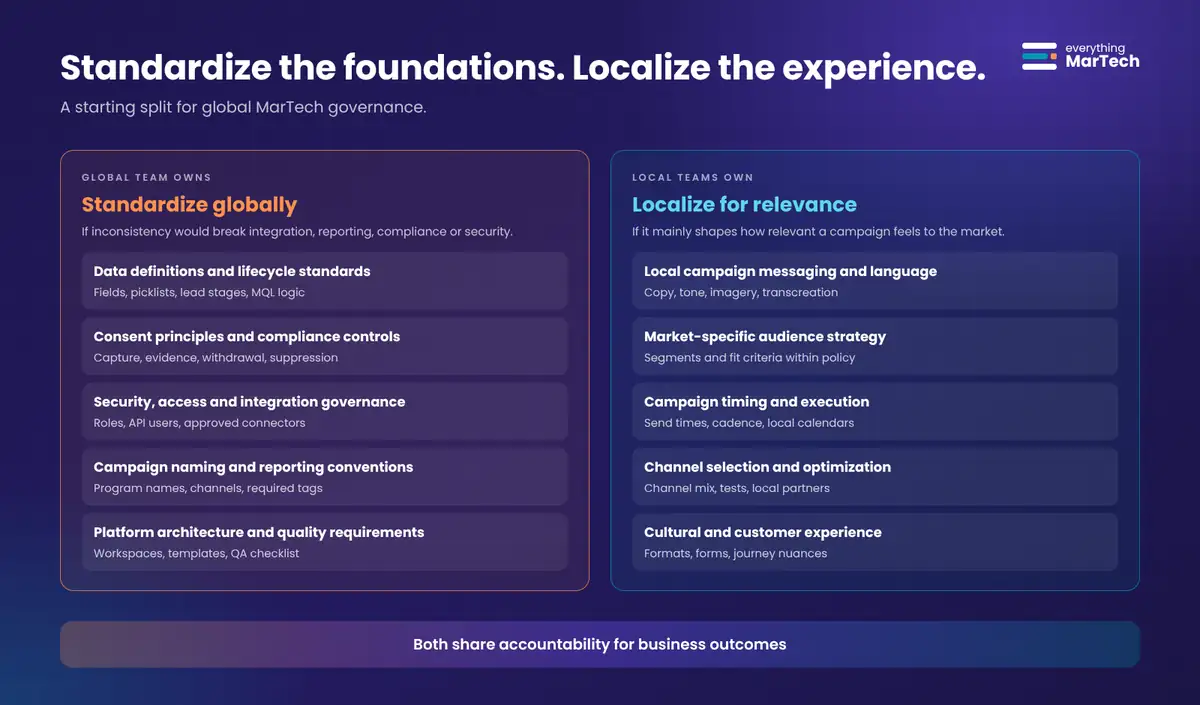
Two columns: standardize globally lists data definitions and lifecycle standards, consent principles and compliance controls, security, access and integration governance, campaign naming and reporting conventions, and platform architecture and quality requirements; localize for relevance lists campaign messaging and language, market-specific audience strategy, timing and execution, channel selection and optimization, and cultural and customer experience. A band reads both share accountability for business outcomes.

When an item does not fit either list neatly, use the decision tree below. It turns a debate into three questions.
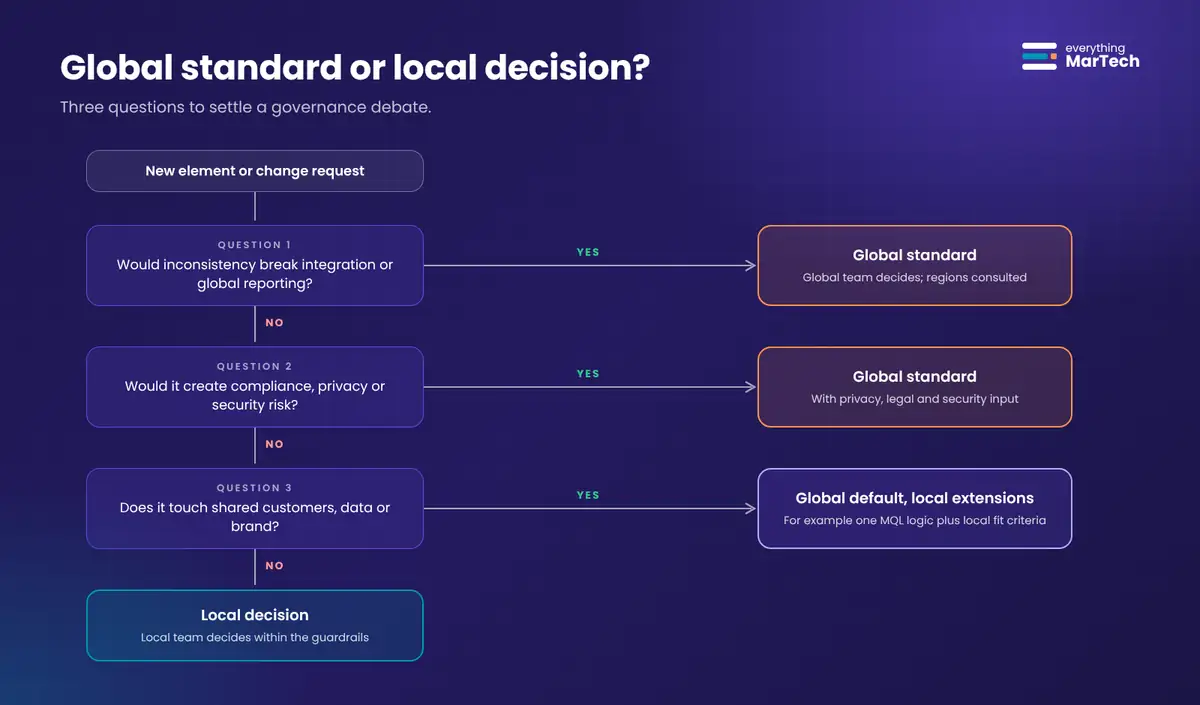
Decision tree with three questions: would inconsistency break integration or global reporting, would it create compliance, privacy or security risk, and does it touch shared customers, data or brand. Yes to the first two leads to a global standard; yes to the third leads to a global default with local extensions; no to all three leads to a local decision within the guardrails.

3. Build governance into technology, not just documentation

A 50-page governance document means little if marketers must manually remember every rule. Instead, embed standards into everyday workflows:

Mechanism What it enforces Example in Adobe Marketo Engage (verified features)
Approved campaign templates Structure, tokens, required campaigns, QA steps Template programs kept in a shared folder; local teams clone them. Shared folders are read-only in the receiving workspace.
Automated naming validation Naming pattern, country and type codes A scheduled read-only API audit of program names (see the appendix)
Required metadata Reporting dimensions Custom tag types set as Required for chosen program types, so a value must be chosen when a program is created
Role-based access controls Who can approve, activate, change admin settings or reach which markets Roles grouped from permissions, assigned per workspace in Admin > Users & Roles
Required campaign quality checks Content, links, tokens, consent and suppression logic A pre-launch checklist in the template program, plus approval before activation
Reusable integrations and reporting frameworks One way to connect CRM, webinar and event tools; one reporting model Central integration ownership; shared reporting definitions
Clearly defined approval workflows Who approves high-risk changes Tiered approvals by risk and market maturity, managed in your workflow tool

Good governance should make the right way of working easier than the wrong way. If cloning the approved template is faster than building from scratch, people will use the template.

4. Recognize that countries operate at different maturity levels

Not every market has the same expertise, resources or operational capacity. A mature marketing automation team may need more execution autonomy. A smaller market may benefit from centrally managed templates, training and extra operational support. The standards can remain consistent while the support model differs.
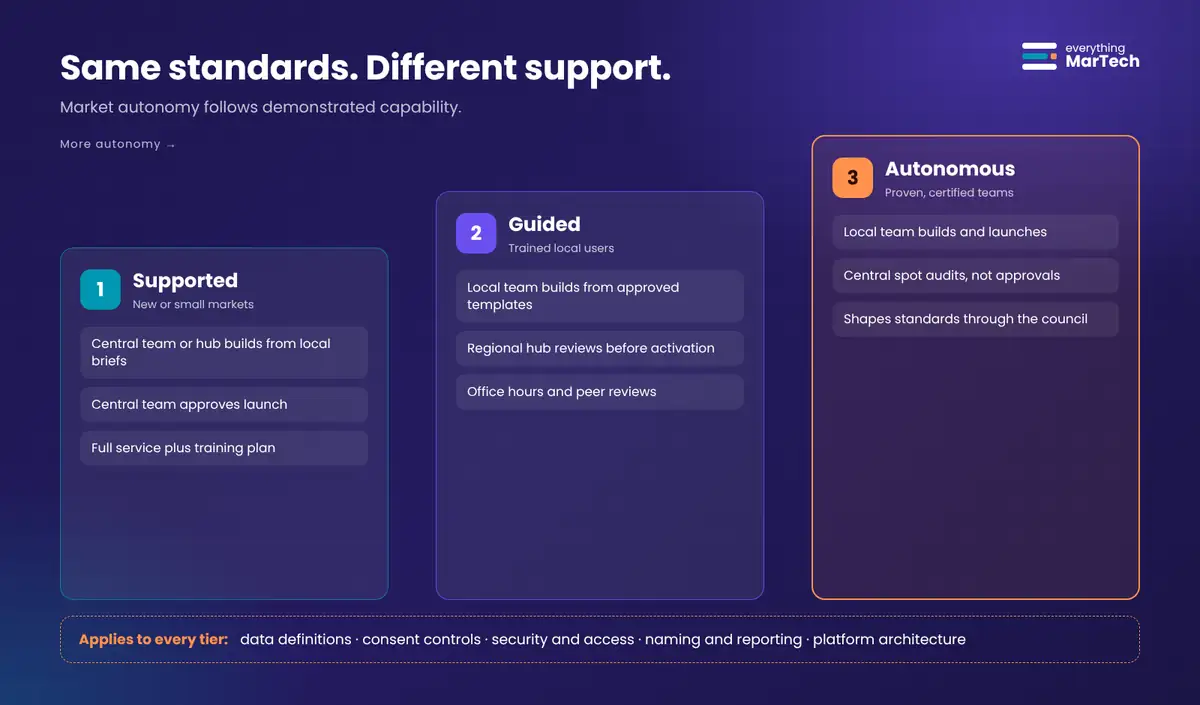
Three tiers of market support rising from left to right: Supported markets where the central team or hub builds and approves, Guided markets where local teams build from templates and a regional hub reviews, and Autonomous markets that build and launch with central spot audits. A band states that data definitions, consent controls, security and access, naming and reporting, and platform architecture apply to every tier.
Tier Typical market profile Who builds Who approves launch Central support
1. Supported No dedicated MOps person, low volume, new to the platform Central team or regional hub, from local briefs Central team Full service; training plan toward Tier 2
2. Guided Trained local users, moderate volume Local team, from approved templates Regional hub reviews before activation Office hours, peer reviews, template updates
3. Autonomous Certified local admins, high volume, strong track record Local team, including local templates within standards Local team; central spot audits Access to the governance council and early pilots

Promotion between tiers should depend on criteria a market can see and work toward, for example: a number of trained or certified users, a period of campaigns launched without critical QA defects, naming compliance above an agreed threshold, and no unresolved consent incidents. Demotion should be possible too, but treat it as support, not punishment.

5. Measure governance by outcomes, not restrictions

The goal is not to maximize the number of rules. It is to improve outcomes. These six metrics give governance a scorecard. The definitions are suggestions; set your own targets from a measured baseline.
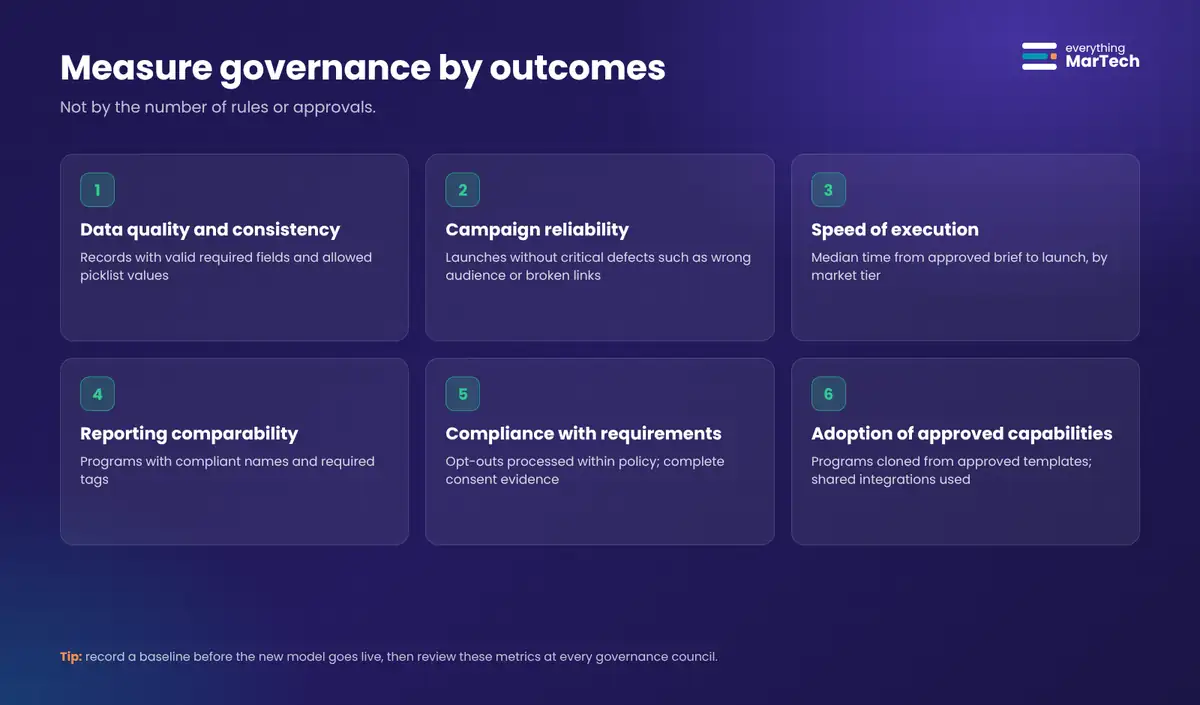
Scorecard with six governance outcome metrics: data quality and consistency, campaign reliability, speed of execution, reporting comparability, compliance with requirements and adoption of approved capabilities, each with an example measure.
Outcome Example measure How to measure it
Data quality and consistency Share of records with valid required fields and allowed picklist values Scheduled data audits or smart lists per country
Campaign reliability Campaigns launched without critical defects (wrong audience, broken links, missing tokens) QA checklist results and incident log
Speed of execution Median time from approved brief to launch, per tier Timestamps in your request or project tool
Reporting comparability Share of programs with compliant names and required tags The naming audit script plus tag reports
Compliance with applicable requirements Opt-outs processed within your policy window; consent records with complete evidence Consent field audits, unsubscribe processing logs
Adoption of approved capabilities Share of programs cloned from approved templates; use of shared integrations Program audits, template usage counts

Use the three levels from Lab #001: technical success (the rules run), operational success (teams work faster and with fewer errors) and business impact (comparable reporting supports better decisions). If governance improves the first level and harms the second, it needs adjusting.

Who decides what: the decision rights matrix

Most governance conflict comes from ambiguity: two teams both believe they own a decision, or nobody does. A decision rights matrix fixes that. The version below uses a simple RACI-style notation: D decides, C is consulted, I is informed, E executes.

Decision Global MarTech CoE Regional hub Local team Privacy and legal IT security
Lifecycle stage definitions and MQL logic D C C I
New global field or picklist value D C C C
New local field (country-specific) D (approves) C E (requests) C
Consent capture principles and wording rules C I I D
Country-specific consent wording C C E D
Program naming convention and required tags D C I
Campaign messaging, language and creative I C D
Audience selection within policy I C D C (if sensitive)
Campaign timing and channel mix I C D
New integration or vendor C C E (requests) C D
Roles, permissions and API users D C I C
Workspace or partition changes D C I C C
Activation of a campaign to a new audience I D for Tier 1 to 2 D for Tier 3
Exceptions to a global standard D (via council) C E (requests) C C

Publish the matrix where people work (your intranet, the template program description, the request form) and review it at every governance council.

Step-by-step: implement federated governance

The ten steps below take an organization from “twenty ways of working” to a governed federated model. Steps 4 to 7 include verified configuration paths for Adobe Marketo Engage. If you use another platform, the objective and verification of each step still apply; equivalents for Salesforce Marketing Cloud Engagement and HubSpot are noted where they exist.
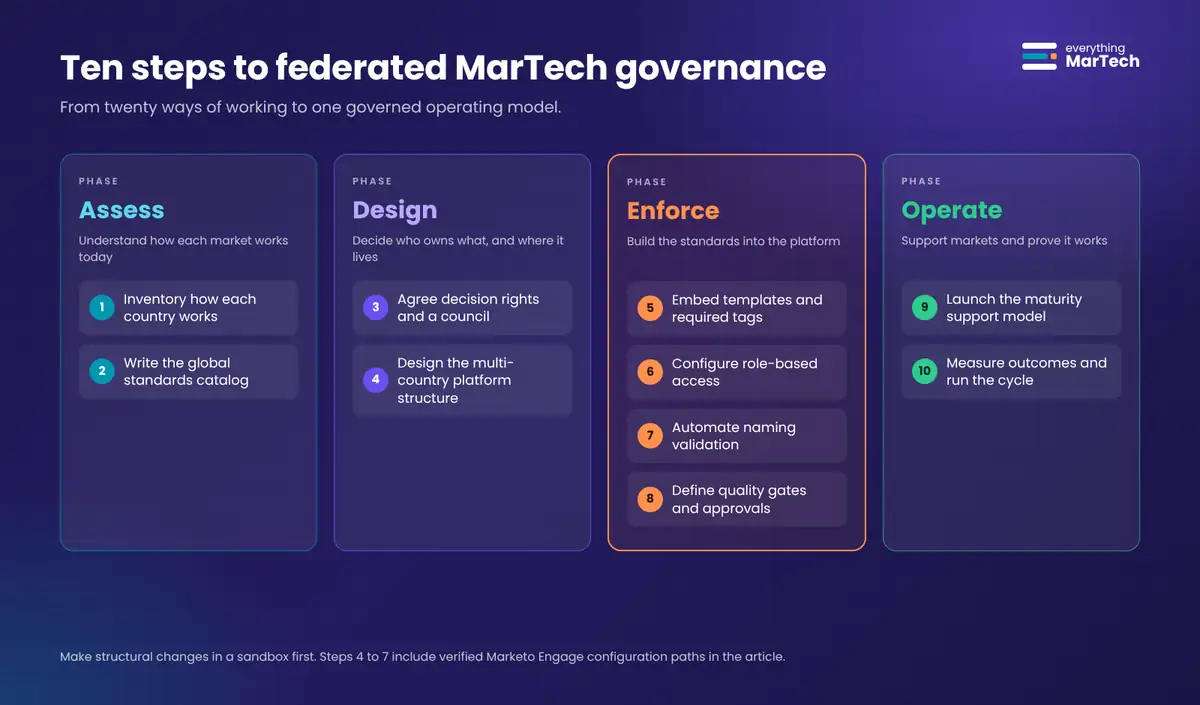
Ten implementation steps grouped into four phases: assess (inventory how each country works, write the global standards catalog), design (agree decision rights and a council, design the multi-country platform structure), enforce (embed templates and required tags, configure role-based access, automate naming validation, define quality gates and approvals) and operate (launch the maturity support model, measure outcomes and run the cycle).

Before you start: make every structural change in a sandbox first if you have one. Workspace, partition, tag and role changes affect every user, and some (such as removing a program type from a tag’s “applies to” list) delete existing values.

Step 1: Inventory how each country works today

Objective: replace opinions with facts about the current state, so standards are based on real practice.

Prerequisites: read access to the marketing automation platform and CRM; a contact in each country or region; Marketo API credentials for a read-only API user if you want to run the audit script.

Navigation: your platform’s admin and asset areas; in Marketo, Admin for workspaces, partitions, tags and users, and Marketing Activities for programs.

Detailed Instructions:

  1. List every country and business unit that uses the platform, with its workspace or business unit, number of active users and approximate monthly campaign volume.
  2. Export the program list. In Marketo, run the naming audit script in report-only mode, or export from the interface. Note how many different naming patterns exist.
  3. Collect each country’s lifecycle definitions: what counts as a lead, MQL, SAL and SQL, and who changes status.
  4. List custom fields created for one country only, and picklist values that mean the same thing (for example “Germany”, “DE” and “Deutschland”).
  5. Record how consent is captured in each country: form wording, checkbox behavior, double opt-in or not, and which fields store it.
  6. Interview two or three local marketers per region: what slows them down, and what they work around.

Example Configuration: a simple inventory sheet with columns Country | Workspace | Users | Programs (last 12 months) | Naming patterns found | MQL definition | Consent method | Local fields | Top 3 pain points.

Expected Result: a one-page picture of where practices differ, and which differences actually cause problems.

How to Verify: each country lead confirms their row is accurate. Totals match platform counts (users in Admin > Users & Roles, programs from the API or export).

Common Mistakes: auditing only the platform and skipping interviews (you miss the workarounds); treating every difference as a problem (some differences are legitimate localization).

Troubleshooting: if the API audit returns fewer programs than expected, check that the API user’s role can see all workspaces. If a country has no clear lifecycle definition, record “undefined” rather than guessing.

Visual Requirement: a heat map of countries against standards (green = consistent, amber = minor variation, red = conflicting practice).

Step 2: Write the global standards catalog

Objective: define the short list of non-negotiable standards, using the five categories from principle 1.

Prerequisites: the inventory from Step 1; a named owner for each category (for example, data standards owned by the MarTech architect, consent principles by privacy).

Navigation: a shared, version-controlled location: a wiki page, a git repository or a document with change history.

Detailed Instructions:

  1. Create one section per category: data and lifecycle, consent and compliance, security and access, naming and reporting, architecture and quality.
  2. For each, write rules as testable statements (“Every program has a Country tag”) rather than aspirations (“Programs should be well organized”).
  3. Add a data dictionary: field API name, label, type, allowed values, owner, and whether local teams may extend it.
  4. Define the naming convention with a pattern and three examples. This guide uses YYYY-MM_CC_TYPE_Short-Name, the same convention as Lab #002.
  5. Mark each rule as enforced by platform, enforced by audit or enforced by review. Aim to move rules toward the first two over time.
  6. Give the catalog a version number and a change log.

Example Configuration:

Rule NR-01  Program names match YYYY-MM_CC_TYPE_Short-Name      Enforcement: audit (weekly)
Rule NR-02  Country and Business Unit tags are required          Enforcement: platform (required tag)
Rule DL-03  Lifecycle stage changes only via global campaigns    Enforcement: platform (permissions)
Rule CC-01  Opt-in stores date, source, wording version, region  Enforcement: review + audit

Expected Result: a catalog of roughly 15 to 30 rules that fits on a few pages.

How to Verify: every rule has an owner, an enforcement method and a way to test it. Ask a local marketer to read it; if they cannot tell what is mandatory, rewrite it.

Common Mistakes: copying a vendor’s best-practice list wholesale; writing rules no one can check; letting the catalog grow without retiring old rules.

Troubleshooting: if stakeholders cannot agree on a rule, apply the decision tree: does inconsistency break something shared? If not, it is probably a local decision.

Visual Requirement: the standardize vs localize graphic above, adapted with your own rules.

Step 3: Agree decision rights and set up a governance council

Objective: make ownership explicit and create one forum for changes and exceptions.

Prerequisites: sponsorship from a senior marketing leader; the standards catalog draft.

Navigation: your collaboration and meeting tools; publish the matrix next to the standards catalog.

Detailed Instructions:

  1. Start from the decision rights matrix and adjust rows to your organization.
  2. Name the council members: the global MarTech lead (chair), one representative per region, privacy, IT security and a reporting or analytics owner.
  3. Set a cadence (monthly is common at the start) and a fixed agenda: proposed standard changes, exception requests, metrics review, template roadmap.
  4. Define the exception process: who can request one, what information is needed, the maximum duration, and how it is recorded.
  5. Agree a service level for change requests so the council does not become a new bottleneck.

Example Configuration: exception request fields: Requesting market | Standard affected | Reason | Risk | Proposed duration | Compensating control | Decision | Expiry date.

Expected Result: a published matrix, a council calendar and an exception log.

How to Verify: pick five recent decisions and check that the matrix names exactly one decider for each.

Common Mistakes: a council with no decision authority; no regional representation; exceptions with no expiry date that silently become permanent.

Troubleshooting: if the council keeps deferring decisions, give the chair the authority to decide after one round of consultation.

Visual Requirement: the decision rights matrix as a one-page graphic.

Step 4: Design the platform structure for multiple countries

Objective: structure the platform so ownership is clear, shared assets are reusable and data is separated only where it must be.

Prerequisites: Marketo Admin permissions; the inventory; input from privacy on any data separation requirements. Adobe’s documentation notes that workspaces and person partitions can be complex to set up and recommends contacting Marketo Support before you do.

Navigation: Admin > Workspaces & Partitions.

Detailed Instructions:

  1. Decide what needs separate workspaces. Adobe describes workspaces as separate areas that hold marketing assets (programs, landing pages, emails and more), used for example by geography or business unit. Adobe also notes that if teams share marketing assets, workspaces may not be the right tool.
  2. Decide whether you need separate person partitions. Person partitions act like separate databases: people in different partitions do not de-dupe or mix. Use them only when workspaces share no people, or when you need duplicates for a business reason.
  3. Choose the partition mapping. Marketo supports one workspace to one partition, one workspace to many partitions, and many workspaces to one partition.
  4. To create a workspace: go to Admin, click Workspaces & Partitions, click New Workspace, enter a Name, select the Person Partitions and a Primary Person Partition, select the workspace language and click Create.
  5. Create a global shared folder for template programs, email templates, snippets and segmentations. Right-click the parent folder, select Share Folder, choose the workspaces and click Save. Only the parent folder can be shared, and shared folders are read-only in the receiving workspace.
  6. Document which asset types can be shared (email templates, landing page templates, models, smart campaigns, smart lists, segmentations, snippets) and which must be cloned into a program (programs, emails, landing pages, forms).

Example Configuration (illustrative): workspaces Global, EMEA, Americas, APAC; one shared person partition so customers are de-duplicated globally; a Global Templates folder shared read-only with all regional workspaces.

Expected Result: each region works in its own workspace, uses global templates from a read-only shared folder, and shares one de-duplicated database unless privacy requires otherwise.

How to Verify: log in as a test user with access to one regional workspace. Confirm the shared folder appears with a padlock (read-only) and that other regions’ programs are not visible.

Common Mistakes: creating a workspace per country by default (it multiplies admin effort and blocks sharing); using person partitions for convenience and later finding the same customer duplicated across partitions; moving a program that has members (Marketo does not allow moving a program with members between workspaces).

Troubleshooting: if people do not appear in a workspace, check the workspace’s partition assignments and the assignment rules; Adobe has a support article on leads not showing up in workspaces and partitions. If a cloned asset fails, check that its template is shared with the destination workspace.

Other platforms: Salesforce Marketing Cloud Engagement uses business units in Enterprise and Enterprise 2.0 accounts to control access and sharing, with shared items folders, shared data extensions with per-business-unit permissions and shared suppression lists from parent to child units. HubSpot offers the Brands add-on for Marketing Hub Enterprise to manage multiple brands in one account (accounts that used Business Units have been migrating to Brands), plus team-based asset partitioning.

Visual Requirement: a workspace and partition map showing which regions share people and which share templates. Capture a real screenshot of Admin > Workspaces & Partitions from your own instance.

Step 5: Embed standards in templates and required tags

Objective: make compliant programs the default by giving every market approved templates and required reporting metadata.

Prerequisites: Marketo Admin permissions for tags; the naming and reporting rules from Step 2; a shared template folder from Step 4.

Navigation: Admin > Tags for tag types; Marketing Activities for template programs.

Detailed Instructions:

  1. Build one template program per common program type (for example webinar, event, email blast, nurture, content). Include standard tokens, required smart campaigns (inactive), a QA checklist in the description and placeholder assets.
  2. Name templates with a recognizable prefix such as TPL_Webinar_v3 and store them in the shared global folder.
  3. Create required tag types. Go to Admin, click Tags, click New and select New Tag Type. Enter the tag type name (for example Country), add values (DE, FR, US and so on) with Add Another, select the program types it applies to, select Required and click Create.
  4. Repeat for Business Unit and any other reporting dimension you need.
  5. If a tag must be required for some program types and optional for others, create two separate tag types, as Adobe recommends.
  6. Version templates. When you change a template, increment the version, record what changed and tell regional hubs.

Example Configuration: tag type Country (required, applies to all program types), values from ISO 3166-1 alpha-2; tag type Business Unit (required), values Cloud, Security, Services.

Expected Result: creating a new program prompts for Country and Business Unit; local teams clone templates instead of building from scratch.

How to Verify: create a test program of each type and confirm the required tags must be set. Clone a template into a regional workspace and confirm tokens and campaigns arrive intact.

Common Mistakes: removing a program type from a tag’s “applies to” list (Adobe warns this deletes the tag and its values from existing programs of that type); too many required tags, which pushes people toward picking any value; templates without an owner.

Troubleshooting: if users cannot see the tag, check their role’s tag permissions (Marketo’s role permissions include access to custom tags). If a template clone fails across workspaces, confirm the template’s emails, forms and landing pages are inside the program.

Rollback: to relax a required tag, edit the tag type and clear Required rather than changing its program types, so existing values are preserved.

Visual Requirement: screenshot of the New Tag Type dialog from your sandbox, and a template program tree.

Step 6: Configure role-based access by workspace

Objective: give each person the permissions their tier and role need, and no more.

Prerequisites: Marketo Admin permissions; the decision rights matrix; the maturity tier of each market.

Navigation: Admin > Users & Roles, Roles and Users tabs.

Detailed Instructions:

  1. Define a small set of roles that mirror the decision rights, for example: Global Admin, Regional Approver, Local Marketer (Builder), Local Marketer (Launch), Analyst (Read Only), and API-only roles per integration.
  2. To create a role: go to Admin, click Users & Roles, open the Roles tab, click New Role, name it, select the permissions and click Create.
  3. Keep activation and approval permissions out of builder roles for Tier 1 and Tier 2 markets, so activation goes through the approver.
  4. Assign roles per workspace: in Admin > Users & Roles, on the Users tab, select the user, click Edit User, select the Roles and Workspaces they need and save. A user can have different roles in different workspaces.
  5. Create API-only users with dedicated roles for each integration, each with a named owner. Give the naming audit’s API user read-only asset permissions.
  6. Review access quarterly: remove leavers, check for users with admin rights who no longer need them.

Example Configuration (illustrative): a German marketer has Local Marketer (Launch) in EMEA (Tier 3) and Analyst (Read Only) in Global; a Brazilian marketer in a Tier 2 market has Local Marketer (Builder) in Americas.

Expected Result: people can do their work in their own region, approvers control activation where the tier requires it, and admin rights are limited to the global team.

How to Verify: log in as test users for each role and attempt an activation, an admin change and access to another region’s workspace. Only allowed actions should succeed.

Common Mistakes: granting Admin to solve a one-off problem; leaving multiple roles selected on a user without realizing that Marketo then defaults to the most restrictive permission; shared logins for agencies.

Troubleshooting: if a user unexpectedly cannot perform an action, check whether several roles are selected for that workspace. Note that you cannot edit your own role; Adobe’s documentation says another admin must do it.

Visual Requirement: a role-to-tier table; screenshot of the Edit User dialog showing roles per workspace.

Step 7: Automate naming validation

Objective: check every program against the naming standard automatically, so compliance is measured instead of assumed.

Prerequisites: a Marketo API-only user with a read-only role; a client ID and secret from a custom service stored in a secrets vault; Python 3.10 or later with the requests package; somewhere to schedule a job (a CI pipeline, a cloud function or a server).

Navigation: Admin > Users & Roles for the API user; Admin > Integrations > LaunchPoint (New Service, service type Custom) for the client ID and secret; your scheduler for the job.

Detailed Instructions:

  1. Copy the naming audit script and edit the configuration: NAME_PATTERN, WORKSPACE_COUNTRIES, TYPE_CHANNELS and the template prefixes to exempt.
  2. Set environment variables MKTO_BASE_URL, MKTO_CLIENT_ID and MKTO_CLIENT_SECRET from your vault. Never hard-code credentials.
  3. Run it once manually: python3 marketo_naming_audit.py. It pages through programs using the documented Browse Programs endpoint (up to 200 per call) and writes naming_audit.csv.
  4. Review findings with each regional hub. Agree a deadline to rename current programs and decide whether to leave historical programs as they are.
  5. Schedule a weekly run. The script exits with code 1 when there are findings, so the scheduler can flag the run and send the CSV to owners.
  6. Add the per-country compliance percentage to your governance scorecard.

Example Configuration: 0 6 * * MON python3 marketo_naming_audit.py in a scheduler, with the CSV sent to the regional hub channel.

Expected Result (illustrative output):

naming-standard v2.1: 37 findings, details in naming_audit.csv
  EMEA       DE    212 programs   97.6% compliant
  EMEA       FR    144 programs   91.0% compliant
  Americas   BR     88 programs   84.1% compliant

How to Verify: create two test programs in a sandbox, one compliant and one with a deliberate error (for example a US country code in the EMEA workspace). The audit should report only the second.

Common Mistakes: giving the audit user write permissions it does not need; auditing template and archive folders; publishing a compliance league table without agreeing the rules first.

Troubleshooting: error 601 or 602 means the access token is invalid or expired (the script refreshes it); 606 means the rate limit was hit (the script backs off and retries); a result with no programs and a “No assets found” warning usually means the API user cannot see the workspace. See Lab #002’s troubleshooting table for more Marketo error codes.

Visual Requirement: a sample of the CSV report and the per-country compliance chart.

Step 8: Define quality gates and tiered approval workflows

Objective: catch high-impact mistakes before launch without sending every routine email to headquarters.

Prerequisites: the decision rights matrix; the maturity tiers; a workflow tool your organization already uses for approvals.

Navigation: your workflow or project tool; the QA checklist in each template program description.

Detailed Instructions:

  1. Classify changes by risk. Low: routine email from a template to an existing, consented audience. Medium: new audience logic, new form, new landing page. High: new data fields, consent wording changes, lifecycle or scoring changes, new integrations.
  2. Map approvals to risk and tier. For example, low-risk launches need peer review in Tier 3, regional hub review in Tier 2 and central build in Tier 1. High-risk changes always go to the global team and, where relevant, privacy or security.
  3. Write a global QA checklist: audience and suppression logic, consent filter present, links and tracking work, tokens resolve, sender and reply-to are correct, unsubscribe link present, test sends reviewed, campaign start and end dates set.
  4. Put the checklist in the template program so it travels with every clone.
  5. Record approvals with who, what and when, so you can audit later.

Example Configuration: a request form field Risk level that routes medium and high requests to the regional approver and global team automatically.

Expected Result: routine work moves quickly; risky changes get the right eyes; there is a record of every approval.

How to Verify: sample ten recent launches per tier and check that each has a completed checklist and the right approver.

Common Mistakes: one approval path for everything; approvers who rubber-stamp because volume is too high; checklists that live outside the workflow.

Troubleshooting: if approval times grow, check the volume per approver and move low-risk work down a tier rather than adding more approvers.

Visual Requirement: a risk-by-tier approval matrix.

Step 9: Launch the maturity-based support model

Objective: give each market the autonomy it has earned and a visible path to more.

Prerequisites: tier criteria agreed by the council; training materials; the roles from Step 6.

Navigation: your learning platform and the governance council agenda.

Detailed Instructions:

  1. Assess each market against the tier criteria and assign a starting tier. Share the assessment with the market lead.
  2. Configure roles to match the tier (Step 6) and approval routing (Step 8).
  3. Provide a training path per tier: platform basics and templates for Tier 1, building and QA for Tier 2, local admin and template design for Tier 3.
  4. Run office hours and peer reviews so knowledge moves between markets, not only from headquarters.
  5. Review tiers quarterly. Promote markets that meet the criteria; agree support plans where quality slips.

Example Configuration: promotion criteria to Tier 3 (illustrative): two certified users, six months without a critical QA defect, naming compliance above 95 percent, no open consent incidents.

Expected Result: markets know their tier, why they are in it and what it takes to move up.

How to Verify: each market lead can state their tier and next step. Roles in Admin > Users & Roles match the published tiers.

Common Mistakes: tiers based on market size instead of capability; no route to promotion; treating Tier 1 as a permanent status.

Troubleshooting: if a strong market resists Tier 2 controls, use evidence (QA results, compliance data) and a time-boxed path to Tier 3 rather than an indefinite review.

Visual Requirement: the three-tier support model graphic above.

Step 10: Measure outcomes and run the governance cycle

Objective: prove the model is working and improve it continuously.

Prerequisites: baseline data from Step 1; the audit script; QA and request data.

Navigation: your BI or reporting tool; the council agenda.

Detailed Instructions:

  1. Build a scorecard with the six outcome metrics, by region and tier.
  2. Record a baseline before the new model goes live, so improvements can be shown rather than claimed.
  3. Review the scorecard at each council meeting. Ask which rules are causing delays without reducing risk, and retire or change them.
  4. Review the exception log. Recurring exceptions usually mean the standard needs updating.
  5. Publish a short change log after each council so local teams see that feedback leads to change.

Example Configuration: a monthly dashboard with one row per region and columns for each outcome metric, plus a trend line against the baseline.

Expected Result: governance decisions are based on evidence, and standards evolve with the business.

How to Verify: after two or three cycles, at least some metrics should show movement against the baseline. If none do, revisit whether the rules target real problems.

Common Mistakes: reporting only the number of rules or approvals; never retiring a standard; measuring compliance without measuring speed.

Troubleshooting: if metrics improve but local teams are unhappy, look at speed of execution and exception turnaround first.

Visual Requirement: the outcome metrics scorecard graphic above.

Want the next lab in your inbox? The Enterprise MarTech Lab publishes practical frameworks like this one. Subscribe to the newsletter.
Illustrative scenario: one Marketo instance, twenty countries

Illustrative scenario. The company, numbers and outcomes below are hypothetical and are used to show how the framework could be applied. They are not a description of a real organization.

The business problem. A B2B technology company runs Adobe Marketo Engage across twenty countries. Germany, the UK and the US have experienced local teams; twelve smaller markets have one generalist marketer each. Leadership wants a global pipeline report, but each region defines an MQL differently and program names follow at least four patterns. Smaller markets wait days for headquarters to build routine emails, while larger markets have quietly built their own templates.

The technical context. One Marketo instance with three regional workspaces (EMEA, Americas, APAC) and one shared person partition; a CRM integration owned by IT; several webinar and event integrations set up by different regions; consent fields that differ between EMEA and the Americas.

The proposed solution. A federated model: a global MarTech CoE owns the standards catalog, templates, integrations and reporting model; three regional hubs review and support; local teams build and launch within the guardrails. Markets are placed in tiers: Germany, the UK and the US in Tier 3; five markets in Tier 2; twelve in Tier 1.

The implementation approach.

  1. Inventory and interviews (Step 1) reveal eleven local fields that duplicate global ones and three conflicting MQL definitions.
  2. The council agrees one MQL logic with room for local fit criteria, and one consent evidence standard reviewed by privacy.
  3. Template programs for the five most common program types are shared read-only from a global folder; Country and Business Unit tags become required.
  4. Roles are rebuilt per workspace; activation is removed from Tier 1 and Tier 2 builder roles.
  5. The naming audit runs weekly; current-quarter programs are renamed, historical programs are left as they are and excluded by date.
  6. A monthly scorecard tracks the six outcome metrics by region.

How success would be measured. Compared with the baseline: naming and tag compliance, share of programs cloned from templates, median brief-to-launch time per tier, critical QA defects per hundred launches, share of records with complete consent evidence, and whether the global pipeline report can be produced without manual reconciliation.

Potential risks and limitations. Tier 3 markets may see new controls as a loss of autonomy; regional hubs need capacity; renaming programs can break saved reports or filters that reference names; a single shared database means privacy must confirm that cross-border processing is permitted; and governance work competes with campaign work for the same people.

Security, privacy and compliance considerations

A shared global platform concentrates both value and risk. Treat these as baseline controls, and involve your privacy, legal and security teams in setting the details.

  • Global consent principles, local legal requirements. Set one global principle for how consent is captured, evidenced and withdrawn, then let privacy and legal define country-specific wording and rules. The legal bases differ: under the EU GDPR, consent must be freely given, specific, informed and unambiguous, the controller must be able to demonstrate it, and withdrawing must be as easy as giving it. Canada’s CASL requires consent (express or implied), identification information and an unsubscribe mechanism for commercial electronic messages, and puts the burden of proving consent on the sender. The US CAN-SPAM Act uses an opt-out model and requires opt-out requests to be honored within 10 business days. A global standard should be able to satisfy the strictest rule that applies to each record.
  • Evidence by design. Store consent date, source, wording version and jurisdiction on the record or in a consent system, so you can show which rule applied. Both GDPR and CASL guidance stress the ability to prove consent.
  • Global suppression. Process unsubscribes and objections across all workspaces and channels, not only in the country that received them.
  • Data residency and transfers. A single global database may involve cross-border data transfers. Confirm with privacy where data is hosted and which transfer mechanisms apply before designing partitions or integrations.
  • Least privilege. Limit admin rights to the global team, use roles per workspace, give every API user a named owner and only the permissions its integration needs, and review access regularly.
  • Integration governance. Approve new integrations centrally; one poorly configured connector can write bad data or expose records for every market.
  • Audit trail. Use your platform’s audit capabilities (Marketo has an Audit Trail in Admin) together with your approval records, so you can reconstruct who changed what.

Alternatives and variations

Federated governance is a strong default, not a universal answer. These variations are worth considering:

Option When it fits Trade-offs
Strong central control (A) Few markets, low local maturity, a platform migration, or a recent compliance incident Bottlenecks as volume grows; plan a route toward federated once foundations are stable
Full local autonomy (B) Business units that share no customers, brand or reporting Duplicated cost; no comparable reporting; harder to consolidate later
Regional hubs Many countries with uneven maturity; time zone or language clusters Adds a layer that must stay aligned with the global standards
Separate instances per region Strict data residency requirements or truly independent businesses No shared database or templates; reporting must be combined elsewhere
Central CoE with agency execution Limited local headcount; seasonal peaks Agencies need the same roles, templates and QA as internal teams

Many organizations evolve over time: central control during a migration, federated once standards and templates exist, with more Tier 3 markets as capability grows.

Common mistakes to avoid

  • Governing by document only. Rules that are not in templates, required fields, permissions or audits are suggestions.
  • Standardizing everything. If the standard covers copy, imagery and send times, local teams will work around it.
  • Standardizing nothing. If lifecycle stages and consent fields vary by country, global reporting and compliance will never be reliable.
  • One support model for every market. It either over-controls mature teams or under-supports new ones.
  • No exception process. Without a legitimate way to deviate, people deviate quietly.
  • A council without authority. Governance forums that cannot decide create the bottleneck they were meant to remove.
  • Measuring rules instead of outcomes. More approvals is not better governance.
  • Ignoring the cost of renaming and restructuring. Changing names, tags or workspaces can break reports and filters; plan the migration.

Troubleshooting guide

Symptom Likely cause What to do
Local teams bypass templates Templates are slow, outdated or missing a common use case Ask why; add or update templates; make cloning the fastest path
Global funnel numbers differ by report Lifecycle definitions or status change logic vary by country Centralize lifecycle campaigns; lock status changes to global campaigns
Naming compliance stays low Rule not enforced at creation; unclear examples Publish examples in the template, run the weekly audit, review results with hubs
Approval queue keeps growing Every change routed to headquarters regardless of risk Introduce risk levels and tiers; move low-risk approvals to peer or hub review
A market cannot see shared templates Folder not shared with that workspace, or role lacks access Share the parent folder with the workspace; check role permissions
People “missing” from a workspace Person partition assignment or assignment rules Check the workspace’s partitions and assignment rules
Duplicate records across countries Separate person partitions, or inconsistent matching fields Review partition design with Marketo Support; standardize email and country fields
Users unexpectedly lack permissions Multiple roles selected, so the most restrictive applies Leave one role per workspace unless the combination is intended
Required tag missing on old programs Tag made required after programs were created Backfill with a one-off audit; the requirement applies at creation
Opt-out from one country still emailed elsewhere Suppression handled per workspace or per system Make unsubscribe processing global and sync it to every connected system

Frequently asked questions

What is global MarTech governance?

Global MarTech governance is the set of standards, decision rights, controls and processes that decide how a marketing technology platform is used across countries and business units. It covers data definitions, consent, security and access, naming and reporting conventions, platform architecture, and how changes and exceptions are approved.

Should marketing operations be centralized or decentralized?

For most global organizations that share customers, brand and reporting, neither extreme works well. A federated model, where a central team owns standards and shared assets and local teams execute within them, combines consistency with local speed. Full centralization can suit small or low-maturity setups, and full decentralization can suit truly independent business units.

What should be standardized globally in marketing automation?

Standardize anything whose inconsistency would break integration, reporting, compliance or security across countries: data definitions and lifecycle stages, consent principles and evidence, roles and access, integration patterns, naming and tagging conventions, and platform architecture and quality requirements.

What should local marketing teams control?

Local teams should control what makes campaigns relevant to their market: messaging and language, audience strategy within approved policies, timing, channel mix and cultural or customer experience choices.

How do you govern Marketo across multiple countries?

Use workspaces to separate regional assets, use person partitions only when data must be separated, share approved templates from a read-only global folder, make reporting tags required, assign roles per workspace, audit program names automatically and route high-risk changes through an approval workflow. Adobe recommends contacting Marketo Support before setting up workspaces and partitions.

What is a federated MarTech operating model?

It is an operating model in which a global team owns the guardrails (standards, architecture, shared assets and reporting), regional or local teams own execution within those guardrails, and both share accountability for business outcomes.

How do you handle markets with different levels of maturity?

Keep one set of standards and vary the support model. Less mature markets get centrally built campaigns and more review; mature markets get more autonomy and lighter, audit-based oversight. Base each market’s tier on clear criteria, such as training, QA results and compliance scores, and review it regularly.

How do you measure whether MarTech governance is working?

Track outcomes rather than rules: data quality, campaign reliability, speed of execution, reporting comparability, compliance with applicable requirements and adoption of approved capabilities. Compare against a baseline taken before the new model goes live.

Conclusion: guardrails, not handcuffs

Global teams should own the guardrails. Local teams should own execution within those guardrails. And both should share accountability for business outcomes.

That is the principle behind a federated MarTech operating model. Not complete centralization. Not uncontrolled decentralization. A deliberate balance of shared standards, clear responsibilities and local autonomy, built into the platform so the right way is also the easy way.

The best global MarTech governance model does not control every action. It enables consistent execution without suppressing local innovation.

Now it is your turn. If you managed marketing automation across 20 countries, which approach would you choose?

  • A. Strong central control
  • B. Full local autonomy
  • C. Federated governance with global standards and local flexibility
  • D. A different model entirely

Share your answer and your reasoning in the comments. I am interested in how others approach this challenge.

Continue the series:

Appendix: naming audit script

The script below is the complete reference implementation used in Step 7. It only makes GET calls, so it can run under a read-only API user. It was tested offline against a mocked Marketo API (valid and invalid names, every rule, paging across three pages, a rate-limit retry and the CSV report). It has not been run against a live Marketo instance; test it in a sandbox first.

Show the complete script (about 230 lines of Python)
"""
Read-only Marketo program naming and taxonomy audit (reference implementation).

EverythingMartech, The Enterprise MarTech Lab #003.

What it does
  1. Pages through every program with the documented Browse Programs endpoint
     (GET /rest/asset/v1/programs.json, maxReturn up to 200, offset paging).
  2. Checks each program against the global naming convention and taxonomy:
     name pattern, country allowed for the workspace, type code allowed,
     and type code consistent with the program channel.
  3. Writes a CSV of findings per workspace and prints a summary per country.

What it deliberately does NOT do
  - Rename, move, update or delete anything. It only makes GET calls, so the
    API user can have a read-only role.

Status: illustrative reference code. It was tested against a mocked Marketo API,
not against a live Marketo instance. Run it against a sandbox first.

Requires: Python 3.10+, requests (pip install requests)
Environment variables: MKTO_BASE_URL (for example https://123-ABC-456.mktorest.com),
MKTO_CLIENT_ID, MKTO_CLIENT_SECRET. Keep the secrets in a vault, never in code.
"""

from __future__ import annotations

import csv
import os
import re
import sys
import time
from collections import Counter, defaultdict
from dataclasses import dataclass

import requests

# ---------------------------------------------------------------------------
# 1. Global standards (owned by the global MarTech team, versioned in git)
# ---------------------------------------------------------------------------

STANDARD_VERSION = "naming-standard v2.1"   # example label, keep it in the report

# Naming convention: YYYY-MM_CC_TYPE_Short-Name, for example 2026-11_DE_WBN_AI-in-Manufacturing
NAME_PATTERN = re.compile(
    r"^(?P<yyyy>20\d{2})-(?P<mm>0[1-9]|1[0-2])_(?P<cc>[A-Z]{2})_(?P<type>[A-Z]{3})_(?P<short>[A-Za-z0-9-]{3,60})$"
)

# Which country codes may appear in each workspace. Example values only.
WORKSPACE_COUNTRIES = {
    "EMEA": {"DE", "FR", "GB", "ES", "IT", "NL", "SE", "PL", "AE", "ZA"},
    "Americas": {"US", "CA", "BR", "MX"},
    "APAC": {"AU", "JP", "SG", "IN", "KR", "CN"},
    "Global": {"XX"},   # "XX" = global programs run by headquarters
}

# Allowed program type codes and the Marketo channel each one must use.
TYPE_CHANNELS = {
    "WBN": {"Webinar"},
    "EVT": {"Tradeshow", "Roadshow", "Field Event"},
    "EML": {"Email Blast"},
    "NUR": {"Nurture"},
    "CNT": {"Content"},
    "OPS": {"Operational"},
}

# Folders that hold templates or archives are reported but not scored.
EXEMPT_NAME_PREFIXES = ("TPL_", "zz_Archive", "_Template")


@dataclass
class Finding:
    workspace: str
    program_id: int
    program_name: str
    channel: str
    country: str
    rule: str
    detail: str


# ---------------------------------------------------------------------------
# 2. Deterministic checks (pure functions, easy to unit test)
# ---------------------------------------------------------------------------

def check_program(p: dict) -> list[Finding]:
    name = p.get("name", "")
    ws = p.get("workspace", "Unknown")
    channel = p.get("channel", "")
    pid = p.get("id", 0)
    if name.startswith(EXEMPT_NAME_PREFIXES):
        return []

    m = NAME_PATTERN.match(name)
    if not m:
        return [Finding(ws, pid, name, channel, "", "name_pattern",
                        "Does not match YYYY-MM_CC_TYPE_Short-Name")]

    cc, type_code = m["cc"], m["type"]
    findings = []
    allowed_countries = WORKSPACE_COUNTRIES.get(ws)
    if allowed_countries is None:
        findings.append(Finding(ws, pid, name, channel, cc, "unknown_workspace",
                                f"Workspace '{ws}' is not in the standard"))
    elif cc not in allowed_countries:
        findings.append(Finding(ws, pid, name, channel, cc, "country_workspace",
                                f"Country {cc} is not allowed in workspace {ws}"))

    if type_code not in TYPE_CHANNELS:
        findings.append(Finding(ws, pid, name, channel, cc, "type_code",
                                f"Type code {type_code} is not in the approved list"))
    elif channel and channel not in TYPE_CHANNELS[type_code]:
        findings.append(Finding(ws, pid, name, channel, cc, "type_channel",
                                f"Type {type_code} should use channel {sorted(TYPE_CHANNELS[type_code])}, found '{channel}'"))
    return findings


def country_of(name: str) -> str:
    m = NAME_PATTERN.match(name)
    return m["cc"] if m else "??"


# ---------------------------------------------------------------------------
# 3. Minimal read-only Marketo client
# ---------------------------------------------------------------------------

class MarketoError(Exception):
    pass


class MarketoReader:
    RETRYABLE = {"606", "615", "604", "608"}   # rate limit, concurrency, timeout, temporarily unavailable
    REAUTH = {"601", "602"}                    # invalid or expired access token
    PAGE_SIZE = 200                            # documented maximum for maxReturn

    def __init__(self, base_url: str, client_id: str, client_secret: str, session=None):
        self.base_url = base_url.rstrip("/")
        self.client_id = client_id
        self.client_secret = client_secret
        self.http = session or requests.Session()
        self._token = None
        self._token_expiry = 0.0

    def _get_token(self) -> str:
        if self._token and time.time() < self._token_expiry - 60:
            return self._token
        resp = self.http.get(
            f"{self.base_url}/identity/oauth/token",
            params={"grant_type": "client_credentials",
                    "client_id": self.client_id, "client_secret": self.client_secret},
            timeout=30,
        )
        resp.raise_for_status()
        body = resp.json()
        self._token = body["access_token"]
        self._token_expiry = time.time() + int(body.get("expires_in", 0))
        return self._token

    def get(self, path: str, params=None, max_attempts: int = 5):
        for attempt in range(1, max_attempts + 1):
            headers = {"Authorization": f"Bearer {self._get_token()}"}
            resp = self.http.request("GET", f"{self.base_url}{path}", params=params,
                                     headers=headers, timeout=60)
            resp.raise_for_status()
            body = resp.json()
            if body.get("success"):
                return body.get("result", [])   # "No assets found" comes back as success with no result
            codes = {str(e.get("code")) for e in body.get("errors", [])}
            if codes & self.REAUTH:
                self._token = None
                continue
            if codes & self.RETRYABLE and attempt < max_attempts:
                time.sleep(min(2 ** attempt, 20))
                continue
            raise MarketoError(body.get("errors", []))
        raise MarketoError([{"code": "retry", "message": "Gave up after retries"}])

    def all_programs(self):
        offset = 0
        while True:
            page = self.get("/rest/asset/v1/programs.json",
                            params={"maxReturn": self.PAGE_SIZE, "offset": offset})
            yield from page
            if len(page) < self.PAGE_SIZE:
                return
            offset += self.PAGE_SIZE


# ---------------------------------------------------------------------------
# 4. Report
# ---------------------------------------------------------------------------

def run_audit(programs, out_path: str = "naming_audit.csv") -> dict:
    findings, totals = [], Counter()
    for p in programs:
        if p.get("name", "").startswith(EXEMPT_NAME_PREFIXES):
            continue
        totals[(p.get("workspace", "Unknown"), country_of(p.get("name", "")))] += 1
        findings.extend(check_program(p))

    with open(out_path, "w", newline="", encoding="utf-8") as f:
        w = csv.writer(f)
        w.writerow(["standard", "workspace", "program_id", "program_name", "channel", "country", "rule", "detail"])
        for x in findings:
            w.writerow([STANDARD_VERSION, x.workspace, x.program_id, x.program_name,
                        x.channel, x.country, x.rule, x.detail])

    failing = defaultdict(set)
    for x in findings:
        failing[(x.workspace, x.country or country_of(x.program_name))].add(x.program_id)
    summary = {}
    for key, total in sorted(totals.items()):
        bad = len(failing.get(key, ()))
        summary[key] = {"programs": total, "non_compliant": bad,
                        "compliance_pct": round(100 * (total - bad) / total, 1) if total else 100.0}
    return {"findings": findings, "summary": summary}


def main() -> int:
    reader = MarketoReader(os.environ["MKTO_BASE_URL"], os.environ["MKTO_CLIENT_ID"],
                           os.environ["MKTO_CLIENT_SECRET"])
    result = run_audit(reader.all_programs())
    print(f"{STANDARD_VERSION}: {len(result['findings'])} findings, details in naming_audit.csv")
    for (ws, cc), s in result["summary"].items():
        print(f"  {ws:<10} {cc:<3} {s['programs']:>4} programs  {s['compliance_pct']:>5}% compliant")
    return 1 if result["findings"] else 0   # non-zero exit lets a scheduler flag the run


if __name__ == "__main__":
    sys.exit(main())

Offline tests are in code/test_marketo_naming_audit.py (run python3 test_marketo_naming_audit.py).

References

  1. Adobe Experience League. “Understanding Workspaces and Person Partitions” (Marketo Engage). https://experienceleague.adobe.com/en/docs/marketo/using/product-docs/administration/workspaces-and-person-partitions/understanding-workspaces-and-person-partitions
  2. Adobe Experience League. “Create a New Workspace.” https://experienceleague.adobe.com/en/docs/marketo/using/product-docs/administration/workspaces-and-person-partitions/create-a-new-workspace
  3. Adobe Experience League. “Assign Person Partitions to Workspaces.” https://experienceleague.adobe.com/en/docs/marketo/using/product-docs/administration/workspaces-and-person-partitions/assign-person-partitions-to-workspaces
  4. Adobe Experience League. “Allow User Access to a Workspace.” https://experienceleague.adobe.com/en/docs/marketo/using/product-docs/administration/workspaces-and-person-partitions/allow-user-access-to-a-workspace
  5. Adobe Experience League. “Create, Delete, Edit and Change a User Role.” https://experienceleague.adobe.com/en/docs/marketo/using/product-docs/administration/users-and-roles/create-delete-edit-and-change-a-user-role
  6. Adobe Experience League. “Descriptions of Role Permissions.” https://experienceleague.adobe.com/en/docs/marketo/using/product-docs/administration/users-and-roles/descriptions-of-role-permissions
  7. Adobe Experience League. “Create Custom Tags.” https://experienceleague.adobe.com/en/docs/marketo/using/product-docs/administration/tags/create-custom-tags
  8. Adobe Experience League. “Programs” (Marketo Engage REST API). https://experienceleague.adobe.com/en/docs/marketo-developer/marketo/rest/assets/programs
  9. Adobe Experience League. “Leads not showing up in Workspaces and Partitions.” https://experienceleague.adobe.com/en/docs/experience-cloud-kcs/kbarticles/ka-28233
  10. Salesforce Help. “Business Units in Marketing Cloud Engagement.” https://help.salesforce.com/s/articleView?language=en_US&id=mktg.mc_es_business_units.htm&type=5
  11. Salesforce Help. “Enterprise 2.0 Shared Items.” https://help.salesforce.com/s/articleView?id=mktg.mc_es_shared_items.htm&language=en_US&type=5
  12. HubSpot Knowledge Base. “Manage your brands with HubSpot Brands.” https://knowledge.hubspot.com/branding/manage-your-brands-with-hubspot-brands
  13. Regulation (EU) 2016/679 (General Data Protection Regulation), Articles 4(11) and 7. https://eur-lex.europa.eu/eli/reg/2016/679/oj
  14. European Data Protection Board. “Guidelines 05/2020 on consent under Regulation 2016/679.” https://www.edpb.europa.eu/documents/guideline/guidelines-052020-on-consent-under-regulation-2016679_en
  15. Canadian Radio-television and Telecommunications Commission. “Frequently Asked Questions about Canada’s Anti-Spam Legislation.” https://crtc.gc.ca/eng/com500/faq500.htm
  16. U.S. Federal Trade Commission. “CAN-SPAM Act: A Compliance Guide for Business.” https://www.ftc.gov/business-guidance/resources/can-spam-act-compliance-guide-business

Get the next insight in your inbox.

Prefer to talk it through?

Book a 30 or 60 minute consultation on MarTech, automation or AI workflows.

Comments

Leave a Reply

Your email address will not be published. Required fields are marked *

Newsletter

Get the next insight in your inbox.

Practical insights on marketing automation, AI, enterprise architecture, and technology strategy.

Newsletter consent

Related resources

Three stacked layers labelled technical success, operational effectiveness and business impact. Only the technical success layer is checked, with emails delivered, scores calculated, CRM sync running and workflows error-free.

Marketing Operations

Emails deliver and the CRM sync runs, so why do results disappoint? Separate technical success from business impact and run a practical audit.

Enterprise MarTech Lab #001 · 25 min read

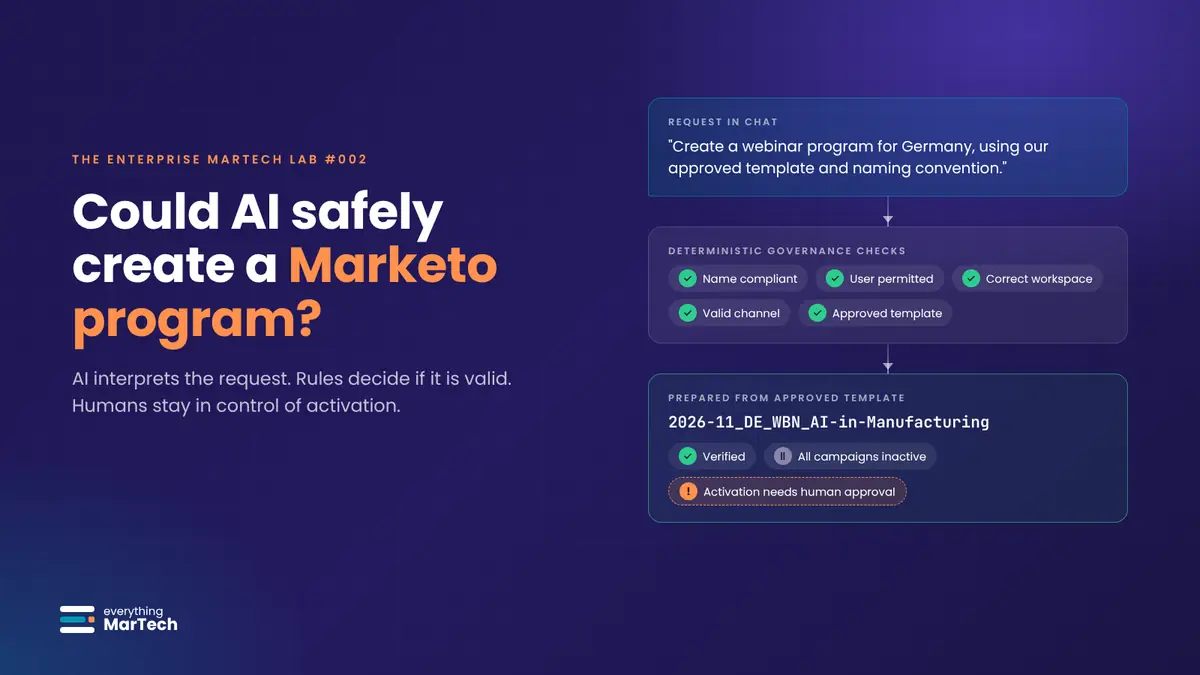
A chat request for a Germany webinar program passes through deterministic governance checks and becomes a Marketo program named 2026-11_DE_WBN_AI-in-Manufacturing, verified with all campaigns inactive and activation waiting for human approval.

AI & Automation

What the Marketo API can and cannot do, a governed architecture with validation and human approval, and where to draw the line between AI and people.

Enterprise MarTech Lab #002 · 35 min read